Learning Friction at Inference Speed

Towards Deeper Understanding Alongside Coding Agents

I am a year late to the process of resolving issues with vibe coded personal software with an “Accept All” mentality. This has worked remarkably well if I think only from the perspective of getting to usable working software prototypes, but has simultaneously induced a dull headache whose source I am still trying to localise. I’ve previously felt similar pains during prolonged learning activities — manually massaging equations on paper; handcrafting/debugging code; and re-designing parts of code — but I would also say those have informed deeper understanding of concepts; the agentic version of this ache has yet to bring obvious understanding to light. So, while one can ship many personally usable things and also scale them for others’ utility at inference-speed, what hasn’t shipped at that speed is an intimate understanding of what lies under the hood. On account of this, sometime in late March, I decided it was time to sober up from this deep intelligence inebriation and re-scope how I worked with coding agents.

Learning speed is inversely proportional to deep understanding, and deep understanding comes from having some learning friction. Agentic chats feel like teleportation; issues are resolved before I can wrap my head around what happened where, but I find myself approximately where I wanted to be. To go beyond vaguely appreciating the need for learning frictions, I am now figuring out which frictions are worth retaining. Classical approaches, like reading or writing notes for myself, serve as personal distillation activities that preserve desirable learning friction; disseminating my learnings about agentic coding to others1 is another useful distillation, but requires having opportunities for and overcoming the fear of public speaking. Making use of agents to accelerate generating associated elements for self-learning is detrimental; outsourcing my capacity of translating thoughts into words to any other entity, agent or human, is a disservice to myself.

When I read about people clamouring for newer IDEs, I think the problem they are thinking about is, “How do I introduce agentic learning frictions?” Newer ways of reading code are waiting to be uncovered and could be one way to solve part of the problem. There might also be better ways to use existing tools and LLMs. And so I am trying to find agentic versions of learning friction that retain the benefits of speed without compromising my long-term understanding.

Below, I demonstrate some things I am having these agents build that feel like solutions to this problem. At this moment, they feel like the kinds of things that are helping me understand how to work with them: by reading and annotating their code using pre-LLM tools — like Obsidian and static websites — in my pipeline.

Botference: Agentic Review Loops

The first builds on the well-trodden idea of using agentic review loops — one agent reviews another’s work — that is sometimes fruitful, but more often entertaining. I suspect such loops are likely more token-efficient when reviewing implemented code, but I prefer now to also use them in reviewing plans prior to coding.

Previously, I used a manual approach of copypasta-ing Claude’s plans to Codex (and vice versa); this helped me see Codex as the more detail-oriented engineer with a bias towards testing everything but also reading code deeply alongside Claude’s bias to prototyping with less thorough codebase exploration. The qualitative gains felt like accelerations to me, but the overhead of flipping from one terminal induced migraines. So, I got the two to scheme on Botference, a Terminal User Interface (TUI) that hosts both models in the same terminal session. The general premise was to collaboratively ideate in a main chatroom with the three of us — this is called Council. However, if we get to a point where changes need to be made to an unfamiliar-to-me codebase2 or they hold differing opinions on some matter, I send them into a private room — called a Caucus — where I can’t chat. The two hash things out in Caucus in about tenish messages to eventually return to the Council to inform me if they have converged on a path forward (or not) and which of them will lead plan authoring; the other agent automatically becomes the reviewer of this plan over as many rounds as I need. Botference’s interface is below:
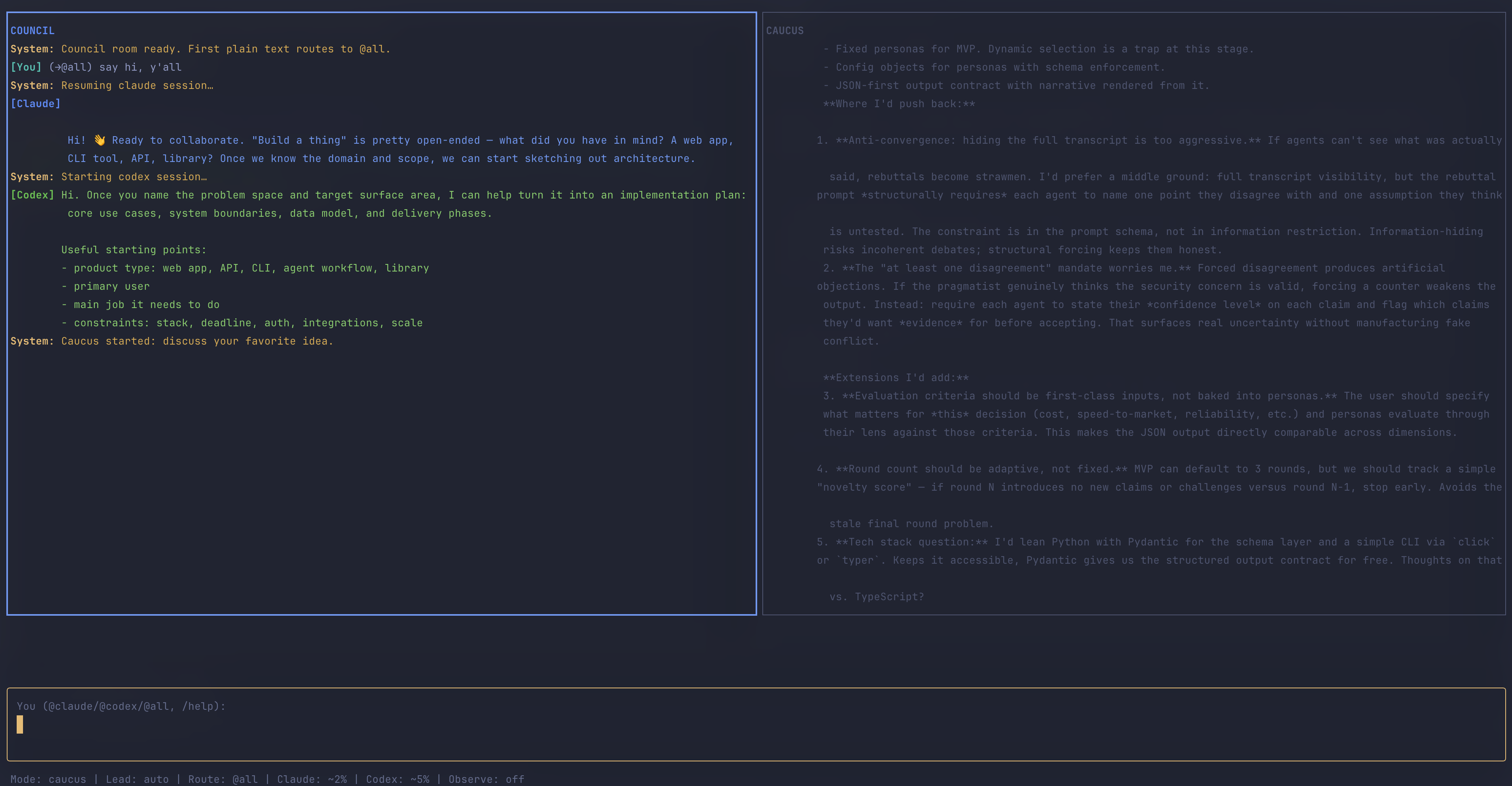
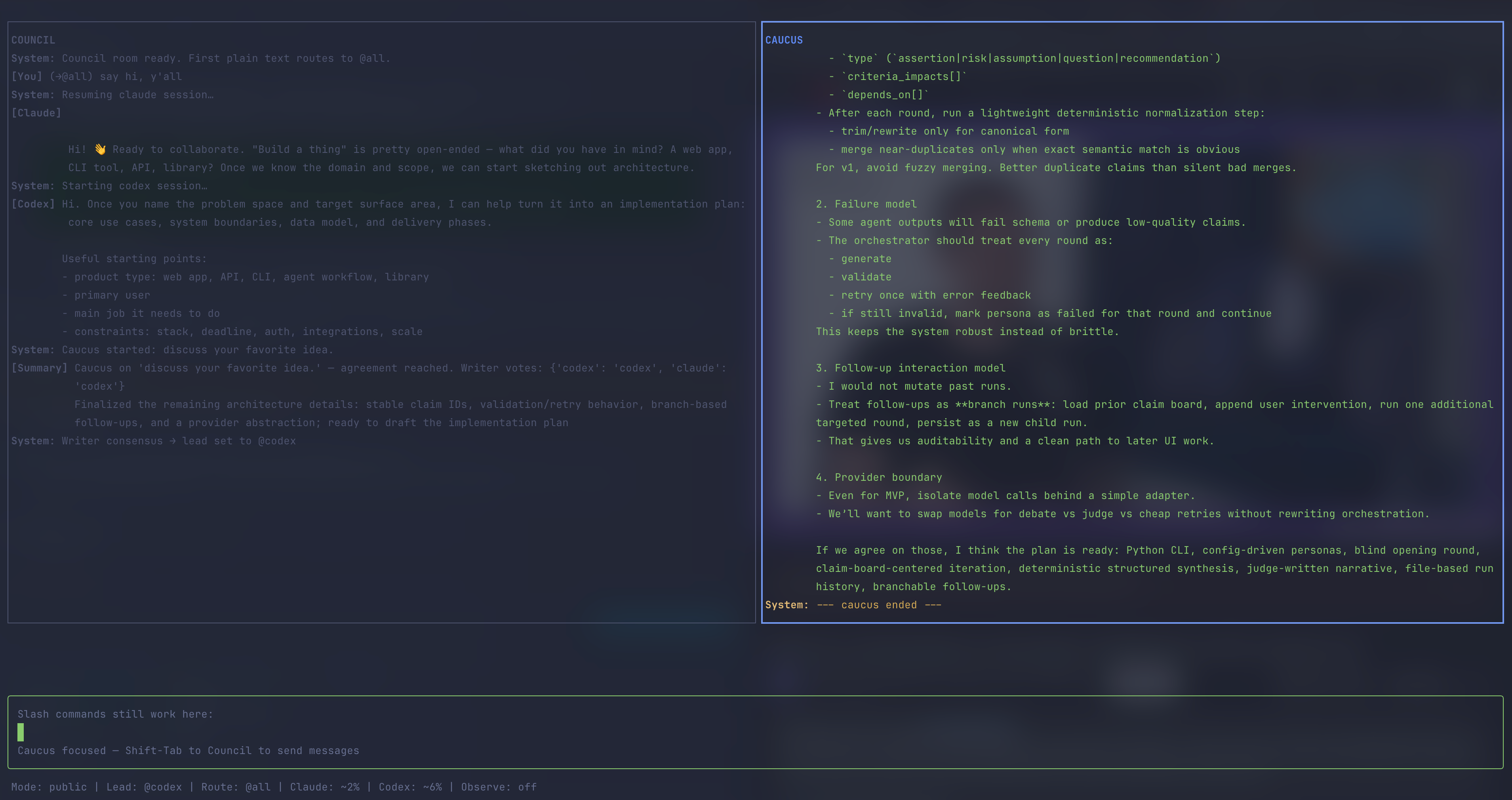
Council is on the left panel, where I talk to Claude and Codex.
Caucus is the right panel, where Claude and Codex talk uninterrupted by us humans.

Though it is difficult to prove whether this is a better way to plan out code than the copypasta approach, I have found it cognitively far more manageable to read a serialised chat between two agents than reading their thoughts in two terminal windows placed side-by-side; this has felt like reading two pages of a book at the same time. The doubling in plan files was cumbersome to read so I quickly defaulted to letting agents decide rather than steering them towards my decisions; this combination of multi-terminal swapping and multi-file spawning was one cause of a headache that is less frequent now — if we ignore the sheer volume of text still being generated inside Botference.

The main artifact from a Botference chat in plan mode is an implementation-plan.md (though additional files can be requested from the agents within the Botference workspace). I usually implement that plan from a second terminal with botference build -p. The -p flag means headless: Botference spawns custom coding agents and gives them tools either through a direct API call or, when I am using my Claude Max subscription rather than an Anthropic API key, through a scoped MCP server. Dropping -p launches a regular interactive Claude Code session instead.

Using two terminals — one to plan, another to build — prevents the build phase from gobbling up the planning chat’s context window, and lets me steer a build more deliberately than I can in a Claude Code or Codex session where plan-and-build share a single chat. This is especially useful when a plan contains human-review gates. Those gates are planned into Botference to force me to navigate the codebase — a deliberate, albeit marginal, learning friction that helps me understand how the code is laid out even if I am not principally writing it.

The next section discusses a feature made with Botference that helps me better read and agentically annotate a codebase for my understanding.

Codetalk: Making Agent Code Legible to Myself

I have derived most use from Botference in my Obsidian vault, which I consider a brownfield codebase — it has years of accumulated notes that inform generation of LLM Knowledge Bases, but is also where this site’s contents are written and then pushed to Github for deployment. In other words, Obsidian is indispensable to my workflow and, fortunately, one I love to edit in. But I seldom use Markdown to explain code-snippets in my blog as I find them an inappropriate format for explaining large chunks of code.

In this agentic era, there is way more code being written and forgotten about than ever before; this means code is either unimportant to read or super-important to read. For this latter case, I had Botference engineer Codetalk as a new way for me to read and annotate code-specific files from Obsidian that I then review from a local build of my site.

Codetalk allows me to drop a spotlight on specific lines of code and make annotations beside it; the rest of the lines are dimmed while an annotation is in view. When a section involves multiple files, they appear as tabs you can switch between. The goal is not to annotate every line, but to trace a path through the parts that matter for a particular discussion. This possibly makes for — or can be further tweaked to offer — a more informative and less linear code-reading experience for other humans than, for example, something like Jupyter BooksI love them nonetheless. allows.

I have introduced it into my workflow in a bid to better review and understand agent-written code. Sometimes I am writing the annotations, at other times the annotations are agentic; I often ask agents to spotlight certain behaviours of a codebase and which files are integral to them so they add annotations for me to read on my browser. This practice becomes not just about reading every line, but understanding which are the right lines to spotlight; this might inform later refactors of a large codebase, or will benefit some other researcher or agent in grokking the core idea in a codebase that is not merely scaffolding.

For a blog post such as this one, the editorial choice of which lines to spotlight and explain remains mine. As a demonstration, Codetalk is used to present three aspects of Botference: the first explores its architecture; the second is a multi-tab control loop that moves between botference.sh and detect.sh; and the third is a multi-tab exploration of how Botference’s build agents get their tools through exec.sh, fallback_agent_mcp.py, and __init__.py.

Botference Architecture

The file tree below follows the execution path of a single Botference run, from the moment you type botference plan to the final archived output once you have completed building what was in the plan. Each section maps to a phase of the system’s lifecycle and so is not a raw ls on the contents of Botference. Scroll through the files in the tabs below to get a sense of how Codetalks works in its current iteration.

architecture.txt
# ── 1. You run botference ────────────────────────────────────────────
 
botference ← the entry point (bash script)
.env ← API keys: ANTHROPIC_API_KEY, OPENAI_API_KEY
context-budgets.json ← which model each agent uses, token limits
 
# ── 2. It sets up the environment ────────────────────────────────────
 
lib/
config.sh ← loads .env, resolves BOTFERENCE_HOME
detect.sh ← reads checkpoint.md to find the current agent
exec.sh ← the main dispatch loop (34K of orchestration)
monitor.sh ← tracks token usage, context %, yield signals
post-run.sh ← after each agent: archive, handoff, cleanup
stream-filter.py ← filters and formats live agent output
 
# ── 3. It picks an agent from the plan ───────────────────────────────
 
.claude/agents/
agent-base.md ← shared rules all agents inherit
agent-template.md ← blank template for creating new agents
 
# Planning
plan.md ← interactive planning (council mode)
orchestrator.md ← AI decides which agents run in what order
 
# Research loop
scout.md ← searches for papers, scores relevance
triage.md ← deduplicates corpus, builds a reading plan
deep-reader.md ← reads PDFs in 5-page chunks, extracts claims
critic.md ← assesses structure, checks compliance
provocateur.md ← stress-tests via negative space and inversions
synthesizer.md ← merges findings into a narrative + outline
 
# Writing loop
paper-writer.md ← drafts sections from the outline
editor.md ← edits with evidence backing
coherence-reviewer.md ← checks for contradictions and drift
 
# Code + figures
coder.md ← writes application code (red/green TDD)
refactorer.md ← restructures code without changing behavior
research-coder.md ← simulations, data analysis, figure scripts
figure-stylist.md ← reviews figure clarity for print
 
# Utilities
security-auditor.md ← read-only security review
role-analyst.md ← job posting analysis and CV fitting
 
# ── 4. The agent reads its instructions ──────────────────────────────
 
specs/
grading-rubric.md ← how agent output quality is scored
writing-style.md ← prose rules agents must follow
publication-requirements.md ← venue-specific constraints (ICML, NeurIPS, etc.)
banned-phrases.txt ← words and phrases agents must never use
scout-output-format.md ← structured output schema for scout
triage-output-format.md ← structured output schema for triage
deep-reader-output-format.md ← structured output schema for deep-reader
critic-output-format.md ← structured output schema for critic
provocateur-output-format.md ← structured output schema for provocateur
synthesizer-output-format.md ← structured output schema for synthesizer
paper-writer-output-format.md ← structured output schema for paper-writer
editor-output-format.md ← structured output schema for editor
coherence-reviewer-output-format.md ← structured output schema for coherence-reviewer
research-coder-output-format.md ← structured output schema for research-coder
figure-stylist-output-format.md ← structured output schema for figure-stylist
 
# ── 5. The agent reads the current state ─────────────────────────────
 
work/ ← runtime state for the current thread
checkpoint.md ← knowledge state table + next task
implementation-plan.md ← task list with dependencies and gates
inbox.md ← operator notes for the current agent
iteration_count ← how many loops have run
HUMAN_REVIEW_NEEDED.md ← blocker: agent cannot proceed
 
templates/
checkpoint.md ← blank checkpoint for new threads
implementation-plan.md ← blank plan for new threads
handoff.md ← agent transition record format
HUMAN_REVIEW_NEEDED.md ← blocker template
 
# ── 6. The agent uses tools to do its work ───────────────────────────
 
tools/
__init__.py ← tool registry: which agent gets which tools
core.py ← file read, write, list, search
citations.py ← citation lookup, verification, manifest
claims.py ← fact-checking claims against corpus
pdf.py ← PDF metadata and figure extraction
search.py ← semantic search over papers
download.py ← download papers from URLs
latex.py ← LaTeX compilation and checks
check_language.py ← prose style and grammar validation
check_journal.py ← venue formatting rules
check_figure.py ← figure clarity and print readiness
verify.py ← citation and claim verification
redact.py ← sensitive content redaction
github.py ← GitHub API integration
interact.py ← human interaction prompts
fmt.py ← output formatting
cli.py ← CLI argument parsing
 
# ── 7. The Python core runs the models ───────────────────────────────
 
core/
botference.py ← main loop: dispatch agents, manage turns (2500 LOC)
botference_agent.py ← bridges agent markdown specs to API calls
providers.py ← model abstraction (Anthropic API, OpenAI API)
cli_adapters.py ← adapts CLI commands to model-specific formats
handoff.py ← agent-to-agent handoff protocol
paths.py ← resolves BOTFERENCE_HOME vs project paths
session_store.py ← persists sessions across runs
room_prompts.py ← builds prompts for council and caucus modes
fallback_agent_mcp.py ← MCP server: exposes tools over stdio

Everything starts with the botference bash script in the terminal; botference plan is to chat with the models and botference build -p to implement the plan. The shell script reads your API keys from .env and checks context-budgets.json to know which model (Claude Opus, Codex) each agent should use and how many tokens it can spend.

Under lib/ are shell scripts that set up the environment via config.sh and provide additional scaffolding for much of the work done during build phase (e.g., detect.sh determines which agent must be used; exec.sh contains the main dispatch loop; monitor.sh watches token budgets and triggers new sessions so that tasks are always completed by agents in the supposed smart zone).

The .claude/agents/ directory is basically how Claude Code recognises user-defined agents; these are more specifically tailored to research paper writing tasks so when I run botference research-plan, both Claude and Codex know about the agents before a single chat message is sent. agent-base.md defines the shared protocol that all agents inherit — checkpoint discipline, yield behavior, incremental commits.

There is a (mostly untested in Botference) Orchestrator agent in orchestrator.md to decide which agents to dispatch and in what order, used in the orchestrated architecture mode for non-serialised builds.

work/ is the live state of the current thread. At first, it contains the outputs of a planning discussion, which are implementation-plan.md that states the sequence of tasks with specific agents for completing the task; and checkpoint.md to track what’s the first task for build mode. When build is started, it follows a Ralph loop philosophy; checkpoint.md also accumulates handoff notes from the outgoing agent as it exits a session which will be consumed by the incoming agent on the next task. inbox.md lets the human operator leave notes for the next agent without interrupting the loop. This is not an elegant solution necessarily, but is one approach to steering the build agents to evaluate or reconsider their work.

Under tools/, Botference defines a shared tool registry. __init__.py maps each agent type to the tools it is allowed to use. The individual files are tool modules. core.py contains the basic local primitives — reading and writing files, running shell commands, and committing or pushing with git.

Some research-specific modules are highlighted here as examples of how the same registry can grow: claims.py can check manuscript claims against evidence; pdf.py can inspect PDFs or render pages; download.py downloads PDFs of papers where available; and latex.py can compile LaTeX or build citation trackers. The important architectural point is not the full list; it is that agents get a scoped subset of these capabilities. A non-research module, search.py, handles file listing and code search; it shows that the registry is not only for research-paper tooling.

The Python core in core/ runs the models: botference.py manages the orchestration loop, botference_agent.py bridges agent markdown specs to direct Anthropic/OpenAI API calls, and providers.py abstracts the model APIs so the rest of the system doesn’t care whether it’s talking to Anthropic or OpenAI.

There are two ways Botference exposes tools to an agent during build. In the direct API path, botference_agent.py passes tool schemas from tools/__init__.py to the model provider and executes returned tool calls locally. In the Claude CLI/subscription fallback, fallback_agent_mcp.py wraps the same registry as an MCP stdio server.

The control loop

Botference has two planning modes — plan for general work and research-plan for academic research agents — and two build paths: headless (-p) or interactive. botference.sh is the shared entry point for all four; detect.sh only enters once build mode takes over, reading the plan/checkpoint state to decide which agent runs to complete the next unchecked task.

I have co-annotated botference.sh, but the rest of them were annotated by agents as I peppered them with questions. Note that these annotations don’t suggest that the code was assessed for quality/concision. They merely give me a sense of what is happening where in the code.

#!/usr/bin/env bash
set -euo pipefail
 
# ── Bootstrap ────────────────────────────────────────────────
# botference must locate the framework root before any abstraction exists.
# This is the one intentionally hardcoded path resolution in the system.
if [ -z "${BOTFERENCE_HOME:-}" ]; then
BOTFERENCE_HOME="$(cd "$(dirname "$0")" && pwd)"
fi
if [ ! -f "${BOTFERENCE_HOME}/core/botference_agent.py" ]; then
echo "Error: BOTFERENCE_HOME (${BOTFERENCE_HOME}) does not contain core/botference_agent.py" >&2
exit 1
fi
export BOTFERENCE_HOME
 
BOTFERENCE_PROJECT_ROOT="$(pwd -P)"
export BOTFERENCE_PROJECT_ROOT
 
source "${BOTFERENCE_HOME}/lib/config.sh"
source "${BOTFERENCE_HOME}/lib/detect.sh"
source "${BOTFERENCE_HOME}/lib/monitor.sh"
source "${BOTFERENCE_HOME}/lib/post-run.sh"
source "${BOTFERENCE_HOME}/lib/exec.sh"
 
parse_loop_args "$@"
export BOTFERENCE_ACTIVE_MODE="$LOOP_MODE"
 
if $SHOW_HELP; then
show_help
exit 0
fi
if [ "$LOOP_MODE" = "init" ]; then
python3 "${BOTFERENCE_HOME}/scripts/init_project.py" --profile "$INIT_PROFILE"
exit 0
fi
init_botference_paths
 
if ! validate_project_agents; then
exit 1
fi
if ! mode_is_allowed "$LOOP_MODE"; then
echo "Error: $LOOP_MODE is disabled by ${BOTFERENCE_PROJECT_CONFIG_FILE}." >&2
exit 1
fi
if [ -n "$CLI_MODEL" ]; then
export ANTHROPIC_MODEL="$CLI_MODEL"
fi
if $PIPE_MODE && { [ "$LOOP_MODE" = "plan" ] || [ "$LOOP_MODE" = "research-plan" ]; }; then
echo "Error: $LOOP_MODE mode is interactive only — remove the -p flag."
exit 1
fi
ARCH_MODE=$(resolve_arch_mode_from_plan "$ARCH_MODE" "$BOTFERENCE_PLAN_FILE")
export ARCH_MODE
 
if [ -n "$PROMPT_FILE" ]; then
PROMPT_FILE="${BOTFERENCE_HOME}/${PROMPT_FILE}"
if [ ! -f "$PROMPT_FILE" ]; then
echo "Error: $PROMPT_FILE not found"
exit 1
fi
fi
if [ "$LOOP_MODE" = "archive" ]; then
bash "${BOTFERENCE_HOME}/scripts/archive.sh"
exit 0
fi
CONTEXT_THRESHOLD=45 # default for <1M windows; overridden to 20 for 1M windows below
CTX_FILE="$BOTFERENCE_RUN/context-pct"
YIELD_FILE="$BOTFERENCE_RUN/yield"
BUDGET_FILE="$BOTFERENCE_RUN/budget-info"
PLAN_AUDIT_FILE="$BOTFERENCE_RUN/plan-audit-failed"
POLL_INTERVAL=5
BACKOFF=60
USAGE_LOG="$BOTFERENCE_LOGS_DIR/usage.jsonl"
AGENT_MAX_RETRIES=3
AGENT_RETRY_DELAYS=(5 15 45)
CB_FILE="$BOTFERENCE_RUN/circuit-breaker"
CB_THRESHOLD=5
CB_CONSECUTIVE_FAILURES=0
COUNTER_FILE="$BOTFERENCE_COUNTER_FILE"
HEARTBEAT_INTERVAL=90
 
CLAUDE_PID=""
MONITOR_PID=""
JSONL_MONITOR_PID=""
LAST_CTRL_C=0
 
restore_circuit_breaker_state
restore_iteration_counter
 
ensure_ink_ui_dist() {
local ink_dir="${BOTFERENCE_HOME}/ink-ui"
local dist_bin="${ink_dir}/dist/bin.js"
local install_cmd="cd ink-ui && npm install"
local rebuild=false
local src
 
if [ ! -f "$dist_bin" ]; then
rebuild=true
else
for src in \
"$ink_dir/build.mjs" \
"$ink_dir/package.json" \
"$ink_dir/package-lock.json"
do
if [ "$src" -nt "$dist_bin" ]; then
rebuild=true
break
fi
done
if ! $rebuild; then
while IFS= read -r src; do
if [ "$src" -nt "$dist_bin" ]; then
rebuild=true
break
fi
done < <(find "$ink_dir/src" -type f)
fi
fi
if $rebuild; then
if ! command -v node >/dev/null 2>&1 || ! command -v npm >/dev/null 2>&1; then
echo "Error: Ink UI requires Node.js and npm." >&2
echo "Run this once after cloning:" >&2
echo " ${install_cmd}" >&2
exit 1
fi
if [ ! -d "$ink_dir/node_modules" ] || [ ! -e "$ink_dir/node_modules/esbuild" ]; then
echo "Error: Ink UI dependencies are not installed." >&2
echo "Run this once after cloning:" >&2
echo " ${install_cmd}" >&2
if [ -f "$ink_dir/package-lock.json" ]; then
echo "If you want the lockfile-pinned install instead, run:" >&2
echo " cd ink-ui && npm ci" >&2
fi
exit 1
fi
echo " Building Ink UI"
(
cd "$ink_dir"
node build.mjs
)
fi
}
 
BUILD_AUDIT_SNAPSHOT=""
BUILD_AUDIT_ALLOWED=""
BUILD_AUDIT_VIOLATIONS=""
 
begin_build_audit() {
if [ -d "${BOTFERENCE_PROJECT_DIR:-}" ]; then
BUILD_AUDIT_SNAPSHOT=$(mktemp)
BUILD_AUDIT_ALLOWED=$(mktemp)
BUILD_AUDIT_VIOLATIONS=$(mktemp)
plan_write_state_snapshot "$BUILD_AUDIT_SNAPSHOT"
fi
}
 
cleanup_build_audit() {
rm -f "${BUILD_AUDIT_SNAPSHOT:-}" "${BUILD_AUDIT_ALLOWED:-}" "${BUILD_AUDIT_VIOLATIONS:-}"
BUILD_AUDIT_SNAPSHOT=""
BUILD_AUDIT_ALLOWED=""
BUILD_AUDIT_VIOLATIONS=""
}
 
enforce_build_audit() {
[ -n "${BUILD_AUDIT_SNAPSHOT:-}" ] || return 0
 
if ! audit_mode_changed_files "build" "$BUILD_AUDIT_SNAPSHOT" "$BUILD_AUDIT_ALLOWED" "$BUILD_AUDIT_VIOLATIONS"; then
echo ""
echo "✗ Build audit failed — unauthorized files changed:"
sed 's/^/ - /' "$BUILD_AUDIT_VIOLATIONS"
cleanup_build_audit
return 1
fi
cleanup_build_audit
return 0
}
 
trap 'handle_interrupt_signal' INT
 
if ! is_interactive_plan_mode; then
print_loop_banner
fi
 
# --- Pre-loop plan validation (safety net) ---
# Planner commit gates are the primary enforcement point for TDD structure.
# This build-start check is a safety net: fail fast before wasting an iteration
# on a plan that would fail commit gates anyway.
if [ -f "$BOTFERENCE_PLAN_FILE" ]; then
if ! validate_plan_tdd_structure "$BOTFERENCE_PLAN_FILE"; then
echo "✗ Plan validation failed — fix TDD task structure before running build."
exit 1
fi
fi
LOOP_EXIT_CODE=0
while true; do
# --- Circuit breaker check ---
if cb_is_open; then
echo ""
echo "╔══════════════════════════════════════════════════════════╗"
echo "║ CIRCUIT BREAKER OPEN — $CB_CONSECUTIVE_FAILURES consecutive failures"
echo "║ Halting to avoid wasting tokens. ║"
echo "╠══════════════════════════════════════════════════════════╣"
echo "║ To resume: ║"
echo "║ rm $CB_FILE && botference -p ║"
echo "║ Or investigate logs/usage.jsonl for error patterns. ║"
echo "╚══════════════════════════════════════════════════════════╝"
break
fi
if ! is_interactive_plan_mode; then
echo "=== Iteration $((ITERATION + 1)) ==="
fi
rm -f "$CTX_FILE" "$YIELD_FILE" "$BUDGET_FILE"
if ! is_interactive_plan_mode; then
sleep 3 # let any dying statusline process finish writing, then clear again
rm -f "$CTX_FILE"
fi
 
# --- Pre-iteration gate check ---
if [ -f "$BOTFERENCE_REVIEW_FILE" ]; then
_gate_template="${BOTFERENCE_HOME}/templates/HUMAN_REVIEW_NEEDED.md"
if ! diff -q "$BOTFERENCE_REVIEW_FILE" "$_gate_template" >/dev/null 2>&1; then
echo ""
echo "╔══════════════════════════════════════════════════════════╗"
echo "║ HUMAN REVIEW STILL PENDING ║"
echo "╚══════════════════════════════════════════════════════════╝"
echo ""
cat "$BOTFERENCE_REVIEW_FILE"
echo ""
echo "To continue: review above, then:"
echo " rm $BOTFERENCE_REVIEW_FILE && botference -p"
break
fi
fi
ITER_START=$(date +%s)
IGNORE_UNTIL=$(( ITER_START + 15 )) # ignore context readings for first 15s (stale cache)
 
# --- Reflection trigger (every 5th iteration) ---
rm -f "$BOTFERENCE_RUN/reflect"
if [ "$ITERATION" -gt 0 ] && [ $(( ITERATION % 5 )) -eq 0 ]; then
touch "$BOTFERENCE_RUN/reflect"
echo " Reflection iteration (mod 5)"
fi
 
# --- Detect thread and agent ---
CURRENT_THREAD=$(extract_thread)
CURRENT_AGENT=$(detect_agent_from_checkpoint "$BOTFERENCE_CHECKPOINT_FILE" "$BOTFERENCE_PLAN_FILE")
if [ "$LOOP_MODE" = "build" ]; then
cleanup_build_audit
begin_build_audit
fi
 
# --- Plan mode: one-shot interactive session, early exit ---
if [ "$LOOP_MODE" = "plan" ] || [ "$LOOP_MODE" = "research-plan" ]; then
CURRENT_AGENT="${CURRENT_AGENT:-plan}"
 
# --- Botference mode: Claude + Codex TUI ---
if $BOTFERENCE_MODE; then
CLAUDE_MODEL_RESOLVED=$(resolve_model "plan")
resolve_model_and_effort "$CLAUDE_MODEL_RESOLVED" "plan"
OPENAI_MODEL="${OPENAI_MODEL:-gpt-5.4}"
OPENAI_REASONING_EFFORT="${OPENAI_REASONING_EFFORT:-high}"
 
if [ -n "$PROMPT_FILE" ]; then
PROMPT=$(cat "$PROMPT_FILE")
else
PROMPT=""
fi
if [ -s "$BOTFERENCE_INBOX_FILE" ]; then
echo " 📬 Absorbing operator notes from inbox.md"
PROMPT="[Operator notes]"$'\n'"$(cat "$BOTFERENCE_INBOX_FILE")"$'\n\n'"$PROMPT"
: > "$BOTFERENCE_INBOX_FILE"
fi
if [ "$LOOP_MODE" = "research-plan" ]; then
PLAN_AGENT_PATH=$(resolve_agent_path "plan")
PLAN_SYSTEM="$(cat "${PLAN_AGENT_PATH:-${BOTFERENCE_HOME}/.claude/agents/plan.md}")"
else
PLAN_SYSTEM=""
fi
PLAN_SNAPSHOT=$(mktemp); PLAN_ALLOWED=$(mktemp); PLAN_VIOLATIONS=$(mktemp)
plan_write_state_snapshot "$PLAN_SNAPSHOT" "plan"
 
# Build debug-panes flag correctly (avoid passing "false" as truthy)
DEBUG_FLAG=""
if $DEBUG_PANES; then
DEBUG_FLAG="--debug-panes"
fi
 
# Load API keys from .env if not already in environment
if [ -f "${BOTFERENCE_HOME}/.env" ]; then
if [ -z "${OPENAI_API_KEY:-}" ]; then
_val=$(grep -m1 '^OPENAI_API_KEY=' "${BOTFERENCE_HOME}/.env" 2>/dev/null | cut -d= -f2 | tr -d "'" | tr -d '"' || true)
[ -n "${_val:-}" ] && export OPENAI_API_KEY="$_val"
unset _val
fi
if [ -z "${ANTHROPIC_API_KEY:-}" ]; then
_val=$(grep -m1 '^ANTHROPIC_API_KEY=' "${BOTFERENCE_HOME}/.env" 2>/dev/null | cut -d= -f2 | tr -d "'" | tr -d '"' || true)
[ -n "${_val:-}" ] && export ANTHROPIC_API_KEY="$_val"
unset _val
fi
fi
 
# Ensure codex has API key auth if available
if [ -n "${OPENAI_API_KEY:-}" ]; then
echo "$OPENAI_API_KEY" | codex login --with-api-key 2>/dev/null || true
fi
echo "Launching Botference Council - Claude=$CLI_MODEL Codex=$OPENAI_MODEL${EFFORT_FLAG:+ effort=${EFFORT_FLAG#--effort }}${OPENAI_REASONING_EFFORT:+ openai-effort=$OPENAI_REASONING_EFFORT}${DEBUG_FLAG:+ debug=on} ui=$UI_MODE"
if [ "$UI_MODE" = "ink" ]; then
ensure_ink_ui_dist
# Pass large strings via temp files to avoid arg-length/escaping issues
_ink_sys=$(mktemp); _ink_task=$(mktemp)
printf '%s' "$PLAN_SYSTEM" > "$_ink_sys"
printf '%s' "$PROMPT" > "$_ink_task"
node "${BOTFERENCE_HOME}/ink-ui/dist/bin.js" \
--anthropic-model "$CLI_MODEL" \
--openai-model "$OPENAI_MODEL" \
--openai-effort "$OPENAI_REASONING_EFFORT" \
${EFFORT_FLAG:+--claude-effort ${EFFORT_FLAG#--effort }} \
--system-prompt-file "$_ink_sys" \
--task-file "$_ink_task" \
$DEBUG_FLAG
rm -f "$_ink_sys" "$_ink_task"
else
python3 "${BOTFERENCE_HOME}/core/botference.py" \
--anthropic-model "$CLI_MODEL" \
--openai-model "$OPENAI_MODEL" \
--openai-effort "$OPENAI_REASONING_EFFORT" \
${EFFORT_FLAG:+--claude-effort ${EFFORT_FLAG#--effort }} \
--system-prompt "$PLAN_SYSTEM" \
--task "$PROMPT" \
$DEBUG_FLAG
fi
EXIT_CODE=$?
 
if ! plan_audit_changed_files "$PLAN_SNAPSHOT" "$PLAN_ALLOWED" "$PLAN_VIOLATIONS"; then
echo ""
echo "✗ Plan audit failed — unauthorized files changed:"
sed 's/^/ - /' "$PLAN_VIOLATIONS"
echo " Build is blocked until these changes are resolved."
EXIT_CODE=1
elif [ "$EXIT_CODE" -eq 0 ]; then
if ! plan_commit_and_push_changes "$PLAN_ALLOWED"; then
EXIT_CODE=1
fi
fi
rm -f "$PLAN_SNAPSHOT" "$PLAN_ALLOWED" "$PLAN_VIOLATIONS"
 
if [ "$EXIT_CODE" -eq 0 ]; then
echo ""
echo "=== Council session complete. Run 'build' to start executing. ==="
fi
break
fi
 
# Build prompt
if [ -n "$PROMPT_FILE" ]; then
PROMPT=$(cat "$PROMPT_FILE")
else
PROMPT=""
fi
if [ -s "$BOTFERENCE_INBOX_FILE" ]; then
echo " 📬 Absorbing operator notes from inbox.md"
PROMPT="## Operator Notes (read and act on these first)"$'\n\n'"$(cat "$BOTFERENCE_INBOX_FILE")"$'\n\n'"$PROMPT"
: > "$BOTFERENCE_INBOX_FILE"
fi
CLAUDE_MODEL=$(resolve_model "$CURRENT_AGENT")
 
# Start context monitor
monitor_context "$$" "$ITER_START" "$IGNORE_UNTIL" "$CURRENT_AGENT" &
MONITOR_PID=$!
 
# Archive check: if all tasks done, ask user before launching plan agent
CHECKED=$(grep -c '^\- \[x\]' "$BOTFERENCE_PLAN_FILE" 2>/dev/null) || CHECKED=0
UNCHECKED=$(grep -c '^\- \[ \]' "$BOTFERENCE_PLAN_FILE" 2>/dev/null) || UNCHECKED=0
if [ "$CHECKED" -gt 0 ] && [ "$UNCHECKED" -eq 0 ]; then
echo " All tasks in implementation-plan.md are complete."
read -r -p " Archive this thread and start fresh? (y/n): " answer < /dev/tty
if [[ "$answer" =~ ^[Yy] ]]; then
bash "${BOTFERENCE_HOME}/scripts/archive.sh"
echo " Archived. Starting fresh."
fi
fi
PLAN_SNAPSHOT=$(mktemp)
PLAN_ALLOWED=$(mktemp)
PLAN_VIOLATIONS=$(mktemp)
plan_write_state_snapshot "$PLAN_SNAPSHOT" "plan"
 
# Run plan agent via claude CLI
if [ "$LOOP_MODE" = "research-plan" ]; then
PLAN_AGENT_PATH=$(resolve_agent_path "plan")
PLAN_SYSTEM="$(cat "${PLAN_AGENT_PATH:-${BOTFERENCE_HOME}/.claude/agents/plan.md}")"
else
PLAN_SYSTEM=""
fi
SYS_ARGS=()
if [ -n "$PLAN_SYSTEM" ]; then
SYS_ARGS=(--append-system-prompt "$PLAN_SYSTEM")
fi
PLAN_CLAUDE_SETTINGS=$(mktemp)
python3 - "$BOTFERENCE_PROJECT_ROOT" "$BOTFERENCE_WORK_DIR" "$PLAN_CLAUDE_SETTINGS" <<'PY'
import json
import sys
from pathlib import Path
project_root = Path(sys.argv[1]).resolve()
work_dir = Path(sys.argv[2]).resolve()
out_path = Path(sys.argv[3])
config_name = os.environ.get("BOTFERENCE_PROJECT_DIR_NAME", "botference")
project_config = project_root / config_name / "project.json"
raw_roots = os.environ.get("BOTFERENCE_PLAN_EXTRA_WRITE_ROOTS", "").strip()
roots = []
if raw_roots:
for root in raw_roots.split(","):
root = root.strip().strip("/")
if root:
roots.append((project_root / root).resolve())
elif not project_config.exists():
roots = [work_dir]
allow = ["Read", "Glob", "Grep", "Bash", "WebSearch", "WebFetch"]
seen = set()
for root in roots:
root_abs = root.as_posix().lstrip("/")
if root_abs in seen:
continue
seen.add(root_abs)
allow.extend([
f"Edit(//{root_abs})",
f"Edit(//{root_abs}/*)",
f"Edit(//{root_abs}/**)",
])
settings = {
"permissions": {
"defaultMode": "dontAsk",
"allow": allow,
},
"sandbox": {
"enabled": True,
"allowUnsandboxedCommands": False,
},
}
out_path.write_text(json.dumps(settings))
PY
PLAN_CLAUDE_CWD="$BOTFERENCE_PROJECT_ROOT"
CLAUDE_DIR_ARGS=()
if [ -n "${BOTFERENCE_PLAN_EXTRA_WRITE_ROOTS:-}" ]; then
IFS=',' read -r -a _plan_roots <<< "$BOTFERENCE_PLAN_EXTRA_WRITE_ROOTS"
first_root=""
for _raw_root in "${_plan_roots[@]}"; do
_clean_root="${_raw_root#/}"
_clean_root="${_clean_root%/}"
[ -n "$_clean_root" ] || continue
_abs_root="$BOTFERENCE_PROJECT_ROOT/$_clean_root"
if [ -z "$first_root" ]; then
first_root="$_abs_root"
PLAN_CLAUDE_CWD="$_abs_root"
else
CLAUDE_DIR_ARGS+=(--add-dir "$_abs_root")
fi
done
if [ "$PLAN_CLAUDE_CWD" != "$BOTFERENCE_PROJECT_ROOT" ]; then
CLAUDE_DIR_ARGS+=(--add-dir "$BOTFERENCE_PROJECT_ROOT")
fi
elif [ ! -f "$BOTFERENCE_PROJECT_CONFIG_FILE" ] && [ "$BOTFERENCE_WORK_DIR" != "$BOTFERENCE_PROJECT_ROOT" ]; then
PLAN_CLAUDE_CWD="$BOTFERENCE_WORK_DIR"
CLAUDE_DIR_ARGS=(--add-dir "$BOTFERENCE_PROJECT_ROOT")
fi
SESSION_ID=$(uuidgen | tr '[:upper:]' '[:lower:]')
resolve_model_and_effort "$CLAUDE_MODEL" "plan"
echo " Model: $CLI_MODEL ($LOOP_MODE — claude CLI${EFFORT_FLAG:+, effort: ${EFFORT_FLAG#--effort }})"
if [ -n "$PROMPT" ]; then
(
cd "$PLAN_CLAUDE_CWD"
echo "$PROMPT" | claude --model "$CLI_MODEL" \
$EFFORT_FLAG \
"${SYS_ARGS[@]}" \
--session-id "$SESSION_ID" \
--name "${CURRENT_THREAD:-botference-plan}" \
--settings "$PLAN_CLAUDE_SETTINGS" \
"${CLAUDE_DIR_ARGS[@]}"
)
 
else
(
cd "$PLAN_CLAUDE_CWD"
claude --model "$CLI_MODEL" \
$EFFORT_FLAG \
"${SYS_ARGS[@]}" \
--session-id "$SESSION_ID" \
--name "${CURRENT_THREAD:-botference-plan}" \
--settings "$PLAN_CLAUDE_SETTINGS" \
"${CLAUDE_DIR_ARGS[@]}"
)
 
fi
EXIT_CODE=$?
rm -f "$PLAN_CLAUDE_SETTINGS"
 
cleanup_pid "$MONITOR_PID"; MONITOR_PID=""
 
# Log interactive session usage
log_interactive_session "$SESSION_ID" "$LOOP_MODE"
 
if ! plan_audit_changed_files "$PLAN_SNAPSHOT" "$PLAN_ALLOWED" "$PLAN_VIOLATIONS"; then
echo ""
echo "✗ Plan audit failed — unauthorized files changed:"
sed 's/^/ - /' "$PLAN_VIOLATIONS"
echo " Build is blocked until these changes are resolved."
EXIT_CODE=1
elif [ "$EXIT_CODE" -eq 0 ]; then
if ! plan_commit_and_push_changes "$PLAN_ALLOWED"; then
EXIT_CODE=1
fi
fi
rm -f "$PLAN_SNAPSHOT" "$PLAN_ALLOWED" "$PLAN_VIOLATIONS"
 
# Plan mode is one-shot — exit after this session
if [ "$EXIT_CODE" -eq 0 ]; then
echo ""
echo "=== Planning session complete. Run 'build' to start executing. ==="
fi
break
fi
 
# --- Build mode: increment iteration counter ---
ITERATION=$((ITERATION + 1))
echo "$ITERATION" > "$COUNTER_FILE"
 
if [ -f "$PLAN_AUDIT_FILE" ]; then
if DIRTY_VIOLATIONS=$(plan_violation_paths_still_dirty); then
echo ""
echo "✗ Build blocked — unresolved plan-mode file violations remain:"
printf '%s\n' "$DIRTY_VIOLATIONS" | sed 's/^/ - /'
echo " Resolve or discard those changes, then rerun plan/build."
break
fi
rm -f "$PLAN_AUDIT_FILE"
fi
 
# --- Build mode: detect agent ---
if [ -n "$CURRENT_AGENT" ] && [ "$CURRENT_AGENT" != "" ]; then
AGENT_PATH=$(resolve_agent_path "$CURRENT_AGENT")
if [ -z "$AGENT_PATH" ]; then
# Checkpoint has a bad Next Task (agent wrote prose instead of a task line).
# Fall back to the implementation plan's first unchecked task.
echo " ⚠ Agent '$CURRENT_AGENT' not found — falling back to implementation plan"
CURRENT_AGENT=$(detect_agent_from_checkpoint /dev/null "$BOTFERENCE_PLAN_FILE")
if [ -n "$CURRENT_AGENT" ]; then
AGENT_PATH=$(resolve_agent_path "$CURRENT_AGENT")
fi
if [ -z "$AGENT_PATH" ]; then
echo " Could not resolve agent from plan either. Skipping."
sleep 5
continue
fi
# Fix the checkpoint so this doesn't repeat
plan_next=$(grep '^\- \[ \]' "$BOTFERENCE_PLAN_FILE" 2>/dev/null \
| grep -v '<task description>\|<agent>' \
| head -1 | sed 's/^- \[ \] //')
if [ -n "$plan_next" ]; then
awk -v task="$plan_next" '
/^## Next Task/ { print; print ""; print task; skip=1; next }
skip && /^## / { skip=0 }
!skip { print }
' "$BOTFERENCE_CHECKPOINT_FILE" > "$BOTFERENCE_CHECKPOINT_FILE.tmp" && mv "$BOTFERENCE_CHECKPOINT_FILE.tmp" "$BOTFERENCE_CHECKPOINT_FILE"
echo " Fixed checkpoint Next Task → $CURRENT_AGENT"
fi
fi
echo " Agent detected: $CURRENT_AGENT (${AGENT_PATH})"
else
# Check if this is a completed plan (all tasks checked off) vs empty template
CHECKED=$(grep -c '^\- \[x\]' "$BOTFERENCE_PLAN_FILE" 2>/dev/null) || CHECKED=0
UNCHECKED=$(grep -c '^\- \[ \]' "$BOTFERENCE_PLAN_FILE" 2>/dev/null) || UNCHECKED=0
if [ "$CHECKED" -gt 0 ] && [ "$UNCHECKED" -eq 0 ]; then
echo ""
echo "╔══════════════════════════════════════════════════════════╗"
echo "║ BUILD COMPLETE — all tasks done ║"
echo "╠══════════════════════════════════════════════════════════╣"
echo "║ To archive this thread, run: ║"
echo "║ bash scripts/archive.sh ║"
echo "║ ║"
echo "║ This will move to ${BOTFERENCE_ARCHIVE_DIR}/<date>_<thread>/: ║"
echo "║ checkpoint.md, implementation-plan.md, ║"
echo "║ ai-generated-outputs/<thread>/, reflections/, ║"
echo "║ ${BOTFERENCE_CHANGELOG_FILE##*/}, inbox.md ║"
echo "║ and restore blank templates. ║"
echo "╚══════════════════════════════════════════════════════════╝"
 
# Auto-compile LaTeX if main.tex exists
if [ -f "main.tex" ]; then
echo "║ Compiling LaTeX..."
compile_result=$(pdflatex -interaction=nonstopmode main.tex 2>&1 && \
bibtex main 2>&1 && \
pdflatex -interaction=nonstopmode main.tex 2>&1 && \
pdflatex -interaction=nonstopmode main.tex 2>&1)
if [ -f "main.pdf" ]; then
echo "║ PDF generated: main.pdf"
else
echo "║ WARNING: LaTeX compilation failed"
echo "$compile_result" | grep "^!" | head -5
fi
fi
else
echo " No task found in checkpoint.md — nothing to do."
echo " Run 'botference plan' to plan next steps,"
echo " or 'bash scripts/archive.sh' to archive."
fi
break
fi
 
# --- Orchestrated mode: AI-driven dispatch ---
if [ "$ARCH_MODE" = "orchestrated" ]; then
ORCH_RC=0
run_orchestrated_phase || ORCH_RC=$?
if [ "$ORCH_RC" -eq 2 ]; then
# Orchestrator says all tasks complete
echo ""
echo "╔══════════════════════════════════════════════════════════╗"
echo "║ BUILD COMPLETE — orchestrator confirmed all tasks done ║"
echo "╚══════════════════════════════════════════════════════════╝"
break
elif [ "$ORCH_RC" -eq 0 ] && [ -n "$CURRENT_AGENT" ]; then
# Orchestrator set CURRENT_AGENT for serial dispatch — fall through to build prompt
echo " Agent dispatched by orchestrator: $CURRENT_AGENT"
elif [ "$ORCH_RC" -eq 0 ]; then
# Orchestrator handled everything (parallel dispatch or adaptation)
if ! enforce_build_audit; then
break
fi
capture_eval_metrics || true
echo ""
echo "=== Iteration $ITERATION complete (orchestrated). Fresh context in 3s... ==="
sleep 3
if [ -n "${MAX_ITERATIONS:-}" ] && [ "$ITERATION" -ge "$MAX_ITERATIONS" ]; then
echo "=== Max iterations ($MAX_ITERATIONS) reached. Exiting. ==="
break
fi
continue
else
# Orchestrator failed — fall through to plan-driven logic
echo " Falling back to plan-driven execution"
fi
fi
 
# --- Parallel mode: run all tasks in current phase concurrently ---
if [ "$ARCH_MODE" = "parallel" ]; then
CURRENT_PHASE=$(detect_current_phase "$BOTFERENCE_PLAN_FILE")
if [ -n "$CURRENT_PHASE" ] && is_parallel_phase "$CURRENT_PHASE"; then
# Validate dependencies before running in parallel
if ! validate_phase_dependencies "$BOTFERENCE_PLAN_FILE" "$CURRENT_PHASE"; then
echo " ⚠ Dependency check failed — falling back to serial execution"
else
run_parallel_phase "$CURRENT_PHASE"
PARALLEL_RC=$?
if ! enforce_build_audit; then
break
fi
capture_eval_metrics || true
echo ""
echo "=== Iteration $ITERATION complete (parallel phase). Fresh context in 3s... ==="
sleep 3
 
if [ -n "${MAX_ITERATIONS:-}" ] && [ "$ITERATION" -ge "$MAX_ITERATIONS" ]; then
echo "=== Max iterations ($MAX_ITERATIONS) reached. Exiting. ==="
break
fi
continue
fi
fi
# Not a parallel phase — fall through to serial execution
echo " Phase not marked (parallel) — running serially"
fi
 
# --- Snapshot plan for single-task enforcement ---
PLAN_BEFORE_SNAPSHOT="$BOTFERENCE_RUN/plan-before-${ITERATION}.md"
cp "$BOTFERENCE_PLAN_FILE" "$PLAN_BEFORE_SNAPSHOT"
 
# --- Build prompt ---
PROMPT=$(cat "$PROMPT_FILE")
 
# Inbox: absorb operator notes if present
if [ -s "$BOTFERENCE_INBOX_FILE" ]; then
echo " 📬 Absorbing operator notes from inbox.md"
PROMPT="## Operator Notes (read and act on these first)"$'\n\n'"$(cat "$BOTFERENCE_INBOX_FILE")"$'\n\n'"$PROMPT"
: > "$BOTFERENCE_INBOX_FILE"
fi
if $PIPE_MODE; then
# Non-interactive: pipe prompt, background claude, poll for context via JSONL monitor
CLAUDE_MODEL=$(resolve_model "$CURRENT_AGENT")
echo " Model: $(resolve_cli_model "$CLAUDE_MODEL")"
 
# Create start marker for JSONL monitor (before launching claude)
touch "$BOTFERENCE_RUN/monitor-start"
 
# Launch JSONL context monitor in background
# Search: BOTFERENCE_HOME first (framework), then GITHUB_WORKSPACE, then CWD
MONITOR_SCRIPT=""
for _s in "${BOTFERENCE_HOME}/.github/scripts/botference-monitor.sh" \
"${GITHUB_WORKSPACE:-.}/.github/scripts/botference-monitor.sh" \
".github/scripts/botference-monitor.sh"; do
if [ -x "$_s" ]; then MONITOR_SCRIPT="$_s"; break; fi
done
if [ -n "$MONITOR_SCRIPT" ]; then
CONTEXT_WINDOW=$(resolve_context_window "$CLAUDE_MODEL")
# 1M windows yield earlier; smaller windows use a 45% threshold.
if [ "$CONTEXT_WINDOW" -ge 1000000 ] 2>/dev/null; then
CONTEXT_THRESHOLD=20
else
CONTEXT_THRESHOLD=45
fi
bash "$MONITOR_SCRIPT" "$CONTEXT_THRESHOLD" "$CONTEXT_WINDOW" &
JSONL_MONITOR_PID=$!
echo " JSONL context monitor started (pid $JSONL_MONITOR_PID)"
fi
 
# Auth-detection: Anthropic model but no API key → use claude -p fallback (OAuth/Max plan)
USE_CLAUDE_FALLBACK=false
AGENT_SYSTEM_PROMPT=""
if is_anthropic_model "$CLAUDE_MODEL" && ! has_anthropic_api_key; then
USE_CLAUDE_FALLBACK=true
echo " No API key detected — using claude -p fallback (OAuth/Max plan)"
AGENT_SYSTEM_PROMPT=$(build_claude_system_prompt "$CURRENT_AGENT")
fi
 
# Launch agent runner with bash-level retries for transient failures
AGENT_ATTEMPT=0
while true; do
rm -f $BOTFERENCE_RUN/output.json
 
if $USE_CLAUDE_FALLBACK; then
MCP_CONFIG=$(build_mcp_config "$CURRENT_AGENT")
resolve_model_and_effort "$CLAUDE_MODEL" "$CURRENT_AGENT"
echo "$PROMPT" | claude --model "$CLI_MODEL" \
$EFFORT_FLAG \
--tools "" \
--mcp-config "$MCP_CONFIG" \
--append-system-prompt "$AGENT_SYSTEM_PROMPT" \
--output-format stream-json \
--verbose \
--dangerously-skip-permissions \
| python3 "${BOTFERENCE_HOME}/lib/stream-filter.py" "$BOTFERENCE_RUN/output.json" &
CLAUDE_PID=$!
else
echo "$PROMPT" | python3 "${BOTFERENCE_HOME}/core/botference_agent.py" --agent "$CURRENT_AGENT" --task - --model "$CLAUDE_MODEL" --output-json $BOTFERENCE_RUN/output.json &
CLAUDE_PID=$!
fi
 
# Wait for first context reading (after ignore window) and print it
for i in $(seq 1 30); do
now=$(date +%s)
if [ "$now" -ge "$IGNORE_UNTIL" ] && [ -f "$CTX_FILE" ]; then
if [[ "$OSTYPE" == "darwin"* ]]; then
file_time=$(stat -f %m "$CTX_FILE" 2>/dev/null || echo 0)
else
file_time=$(stat -c %Y "$CTX_FILE" 2>/dev/null || echo 0)
fi
if [ "$file_time" -ge "$IGNORE_UNTIL" ]; then
start_pct=$(cat "$CTX_FILE" 2>/dev/null | tr -d '[:space:]')
if [ -n "$start_pct" ] 2>/dev/null; then
echo " Starting context: ${start_pct}%"
break
fi
fi
fi
sleep 2
done
monitor_context "$CLAUDE_PID" "$ITER_START" "$IGNORE_UNTIL" "$CURRENT_AGENT" &
MONITOR_PID=$!
 
wait "$CLAUDE_PID" 2>/dev/null
EXIT_CODE=$?
CLAUDE_PID=""
 
cleanup_pid "$MONITOR_PID"; MONITOR_PID=""
 
# Success — break out of retry loop
if [ "$EXIT_CODE" -eq 0 ]; then
break
fi
 
# Check if the failure looks transient (no output JSON = crash before any work)
AGENT_ATTEMPT=$((AGENT_ATTEMPT + 1))
if [ "$AGENT_ATTEMPT" -ge "$AGENT_MAX_RETRIES" ]; then
echo " Agent $CURRENT_AGENT failed after $((AGENT_ATTEMPT + 1)) attempts (exit $EXIT_CODE)"
break
fi
delay=${AGENT_RETRY_DELAYS[$((AGENT_ATTEMPT - 1))]:-45}
echo " [agent retry] $CURRENT_AGENT exited $EXIT_CODE, attempt $((AGENT_ATTEMPT + 1))/$((AGENT_MAX_RETRIES + 1)), waiting ${delay}s..."
sleep "$delay"
done
 
# Stop JSONL monitor if running
cleanup_pid "$JSONL_MONITOR_PID"; JSONL_MONITOR_PID=""
 
# Log post-run usage summary from --output-format json
if [ -f $BOTFERENCE_RUN/output.json ]; then
print_output_json_summary $BOTFERENCE_RUN/output.json
 
# Persist usage data to logs/usage.jsonl
# Extract agent name from checkpoint.md "**Last agent:**" field
AGENT_NAME=$(extract_agent_name)
log_usage_from_output_json $BOTFERENCE_RUN/output.json "$ITERATION" "$AGENT_NAME" "$LOOP_MODE" "$CURRENT_THREAD" \
&& echo " Usage logged to $USAGE_LOG" \
|| echo " (could not log usage data)"
fi
# --- Eval capture ---
post_iteration
if ! enforce_build_audit; then
EXIT_CODE=1
fi
else
# Interactive: monitor runs in background, agent gets the terminal
monitor_context "$$" "$ITER_START" "$IGNORE_UNTIL" "$CURRENT_AGENT" &
MONITOR_PID=$!
 
CLAUDE_MODEL=$(resolve_model "$CURRENT_AGENT")
 
if is_openai_model "$CLAUDE_MODEL"; then
# OpenAI models: use codex CLI for interactive TUI (uses codex's own tools),
# fall back to botference_agent.py (uses botference's per-agent tool registry)
rm -f $BOTFERENCE_RUN/output.json
if command -v codex >/dev/null 2>&1; then
echo " Model: $CLAUDE_MODEL (OpenAI — using codex CLI)"
codex --model "$CLAUDE_MODEL" --full-auto "$PROMPT"
EXIT_CODE=$?
else
echo " Model: $CLAUDE_MODEL (OpenAI — codex CLI not found, using botference_agent.py)"
echo "$PROMPT" | python3 "${BOTFERENCE_HOME}/core/botference_agent.py" --agent "$CURRENT_AGENT" --task - --model "$CLAUDE_MODEL" --output-json $BOTFERENCE_RUN/output.json
EXIT_CODE=$?
fi
cleanup_pid "$MONITOR_PID"; MONITOR_PID=""
 
# Log usage
AGENT_NAME=$(extract_agent_name)
if [ -f $BOTFERENCE_RUN/output.json ]; then
print_output_json_summary $BOTFERENCE_RUN/output.json
log_usage_from_output_json $BOTFERENCE_RUN/output.json "$ITERATION" "$AGENT_NAME" "$LOOP_MODE" "$CURRENT_THREAD" \
&& echo " Usage logged to $USAGE_LOG" \
|| echo " (could not log usage data)"
else
echo " (codex interactive — usage not logged)"
fi
else
# Anthropic models: use claude CLI for interactive TUI
AGENT_SYSTEM_PROMPT=$(build_claude_system_prompt "$CURRENT_AGENT")
SESSION_ID=$(uuidgen | tr '[:upper:]' '[:lower:]')
resolve_model_and_effort "$CLAUDE_MODEL" "$CURRENT_AGENT"
echo " Model: $CLI_MODEL (interactive build — claude CLI${EFFORT_FLAG:+, effort: ${EFFORT_FLAG#--effort }})"
echo "$PROMPT" | claude --model "$CLI_MODEL" $EFFORT_FLAG \
--append-system-prompt "$AGENT_SYSTEM_PROMPT" \
--session-id "$SESSION_ID" --dangerously-skip-permissions
EXIT_CODE=$?
#!/usr/bin/env bash
 
extract_next_task_from_checkpoint() {
local checkpoint_path=$1
local next_task=""
 
next_task=$(grep -i '^\*\*Next Task\*\*:\|^Next Task:' "$checkpoint_path" 2>/dev/null \
| head -1 | sed 's/.*: *//' | sed 's/\*//g')
if [ -z "$next_task" ]; then
next_task=$(awk '/^## Next Task/{found=1; next} found && /[^ ]/{print; exit}' \
"$checkpoint_path" 2>/dev/null)
fi
echo "$next_task" | sed 's/([^)]*)//g; s/\*//g; s/^ *//; s/ *$//'
}
 
extract_first_unchecked_task_block() {
local plan_path=$1
awk '
/^- \[ \]/ {
if (in_block) exit
in_block=1
print
next
}
in_block {
if (/^- \[[ x]\]/ || /^###+? /) exit
print
}
' "$plan_path" 2>/dev/null
}
 
extract_agent_from_task_block() {
local task_block=$1
local agent=""
 
agent=$(printf "%s\n" "$task_block" \
| grep -o '\*\*[^*][^*]*\*\*' \
| tail -1 \
| sed 's/\*\*//g' \
| sed 's/[^a-zA-Z0-9_-]//g')
 
if [ -z "$agent" ]; then
agent=$(printf "%s\n" "$task_block" \
| tail -1 \
| sed 's/^ *//; s/ *$//' )
agent="${agent##* }"
agent=$(echo "$agent" | sed 's/[^a-zA-Z0-9_-]//g')
fi
echo "$agent"
}
 
detect_agent_from_checkpoint() {
local checkpoint_path=$1
local plan_path=${2:-}
local next_task=""
 
next_task=$(extract_next_task_from_checkpoint "$checkpoint_path")
 
# Determine if next_task is a terminal/non-task state.
# Structured task lines start with a digit or checkbox ("- [").
# Anything else is prose (e.g. "Thread ready for review") or an
# explicit terminal marker — fall through to the plan.
local is_terminal=false
case "$next_task" in
none*|None*|"<"*|""|[Aa]ll\ tasks\ complete*|*ready\ to\ archive*|[Ss][Tt][Aa][Gg][Ee]\ [Gg][Aa][Tt][Ee]*)
is_terminal=true
;;
*)
if ! echo "$next_task" | grep -qE '^[0-9]|^- \['; then
is_terminal=true
fi
;;
esac
 
if $is_terminal; then
if [ -n "$plan_path" ]; then
next_task=$(extract_first_unchecked_task_block "$plan_path")
if printf "%s\n" "$next_task" | grep -q '<task description>\|<agent>'; then
next_task=""
fi
else
next_task=""
fi
fi
if [ -z "$next_task" ]; then
echo ""
return
fi
local agent
agent=$(extract_agent_from_task_block "$next_task")
 
# Validate: extracted word must correspond to a real agent file.
# Prevents annotations (e.g. "TDD") from being mistaken for agents.
if [ -n "$agent" ]; then
local agent_file
agent_file=$(resolve_agent_path "$agent")
if [ -z "$agent_file" ]; then
echo ""
return
fi
fi
echo "$agent"

(shared entry) parse_loop_args reads the command-line arguments and sets LOOP_MODE — this is the variable that determines whether Botference runs in plan, research-plan, build, or init mode.

(plan / research-plan) The interactive-only guard. plan and research-plan reject the -p (pipe/headless) flag. You cannot plan headlessly because the whole point of these modes is human steering.

(plan / research-plan) The plan mode entry. If LOOP_MODE is plan or research-plan, CURRENT_AGENT defaults to “plan”. The script resolves models for both Claude and Codex — Claude’s model comes from resolve_model("plan"), while Codex defaults to gpt-5.4.

(research-plan only) The research-plan fork. If the mode is research-plan, the script loads the plan.md agent file as a system prompt — this gives both models awareness of the research agents (scout, deep-reader, critic, etc.) before the session starts. In regular plan mode, PLAN_SYSTEM is left empty.

(plan / research-plan) The Ink TUI council launch. node ink-ui/dist/bin.js starts the React/Ink terminal UI with both models. The system prompt and task are written to temp files to avoid shell escaping issues.

(plan / research-plan) The Python fallback. If the Ink UI is not available, python3 core/botference.py launches the same council session with the same model flags. Both backends produce the same output artifact: an implementation-plan.md.

(handoff: plan ends, build begins) Plan mode is one-shot. After the session: “Planning session complete. Run ‘build’ to start executing.” Build mode picks up from here — the iteration counter increments, and the loop begins detecting agents from the checkpoint.

(headless build: API vs MCP choice) Auth detection for headless builds. If the model is Anthropic but no API key is found, the script assumes it should use the Claude CLI/OAuth subscription path instead of the direct API path. It sets USE_CLAUDE_FALLBACK=true and builds the system prompt. This is where the MCP path gets activated. The larger dispatch logic is supported by three predicates defined in exec.shis_openai_model, has_anthropic_api_key, and is_anthropic_model — which are covered in the agent tool surface section below.

(headless build: MCP fallback) The MCP fallback command. The prompt is piped into the Claude CLI with --tools "" (blanking native tools) and --mcp-config pointing to a generated config that starts fallback_agent_mcp.py. The agent gets exactly the tools its registry permits, nothing more. The MCP server itself is annotated under fallback_agent_mcp.py below.

(headless build: direct API) The direct API command. When an API key is available, the prompt goes through botference_agent.py which calls the Anthropic/OpenAI API directly with the shared tool registry.

(interactive build) What happens when you drop -p. Without the headless flag, Botference launches an interactive claude session with --append-system-prompt. No MCP, no tool blanking — the human is in the loop and can steer directly.

extract_agent_from_task_block grabs the last bold word from a task in the implementation plan. A line like - [ ] 1.2 Write the auth module — **coder** yields coder. This single string is the join key across all four layers: prompt, model, tools, agent file.

The detection flow. detect_agent_from_checkpoint reads the “Next Task” from the checkpoint. If that field contains terminal markers or prose instead of a real task line, it falls through to the implementation plan’s first unchecked task instead.

Validation. The extracted agent name is passed to resolve_agent_path, which checks three locations in precedence order: project-local agent directory, then .claude/agents/ in the working directory, then the framework’s own agents directory. If no file matches, the agent is rejected.

The agent tool surface

These files are the machinery that botference.sh calls into when a build agent needs to run:

  • exec.sh resolves the model and constructs the prompt and MCP config.
  • fallback_agent_mcp.py adapts the tool registry for CLI execution; it is a model-agnostic bridge so nothing in this file references Claude or Codex — it takes an agent name, builds a tool set, and speaks MCP over stdio.
  • __init__.py is the shared tool registry. This mapping feeds both the direct API runner and the MCP fallback.

Together, these files implement the coding-agent pattern discussed in RalPhD: each agent is bound to a role-specific tool set rather than the full kit.

#!/usr/bin/env bash
 
resolve_model() {
local agent_name="${1:-}"
local budgets_file="${BOTFERENCE_HOME}/context-budgets.json"
local model=""
 
# ANTHROPIC_MODEL is a global override — when set, it wins over per-agent config.
# This lets `ANTHROPIC_MODEL=gpt-5.4 botference -p build` run all agents on GPT-5.4.
if [ -n "${ANTHROPIC_MODEL:-}" ]; then
echo "$ANTHROPIC_MODEL"
return
fi
 
# Otherwise check per-agent model in context-budgets.json
if [ -n "$agent_name" ] && [ -f "$budgets_file" ] && command -v jq >/dev/null 2>&1; then
model=$(jq -r --arg a "$agent_name" '.[$a].model // empty' "$budgets_file" 2>/dev/null || true)
fi
if [ -z "$model" ]; then
model="${ANTHROPIC_MODEL:-claude-opus-4-6}"
fi
echo "$model"
}
 
resolve_effort() {
local agent_name="${1:-}"
local budgets_file="${BOTFERENCE_HOME}/context-budgets.json"
local effort=""
 
if [ -n "$agent_name" ] && [ -f "$budgets_file" ] && command -v jq >/dev/null 2>&1; then
effort=$(jq -r --arg a "$agent_name" '.[$a].effort // empty' "$budgets_file" 2>/dev/null || true)
fi
echo "$effort"
}
 
resolve_model_and_effort() {
# Resolves CLI model name and effort flag for a given agent.
# Sets globals: CLI_MODEL, EFFORT_FLAG
# Usage: resolve_model_and_effort <model> <agent_name>
local model="${1:-}"
local agent_name="${2:-}"
local effort
 
CLI_MODEL=$(resolve_cli_model "$model")
effort=$(resolve_effort "$agent_name")
EFFORT_FLAG=""
if [ -n "$effort" ]; then
EFFORT_FLAG="--effort $effort"
fi
}
 
 
is_openai_model() {
local model="${1:-}"
case "$model" in
gpt-*|o1*|o3*|o4*) return 0 ;;
*) return 1 ;;
esac
}
 
# Returns 0 if ANTHROPIC_API_KEY is set to a regular API key (sk-ant-api*).
# OAuth tokens (sk-ant-oat*) and missing keys both return 1.
has_anthropic_api_key() {
local key="${ANTHROPIC_API_KEY:-}"
[ -z "$key" ] && return 1
case "$key" in
sk-ant-api*) return 0 ;;
*) return 1 ;;
esac
}
 
# Returns 0 if the model is an Anthropic model (anything not matched by is_openai_model).
is_anthropic_model() {
local model="${1:-}"
is_openai_model "$model" && return 1
return 0
}
 
# Build the full system prompt for claude -p headless mode.
# Outputs to stdout: path preamble (if needed) + agent .md + tool-via-bash appendix.
build_claude_system_prompt() {
local agent_name="${1:-}"
 
local project_agent_path="${BOTFERENCE_PROJECT_AGENT_DIR}/${agent_name}.md"
local compat_path=".claude/agents/${agent_name}.md"
local framework_path="${BOTFERENCE_HOME}/.claude/agents/${agent_name}.md"
 
local is_reserved=false
if reserved_agent_names | grep -qx "$agent_name"; then
is_reserved=true
fi
 
# Resolve agent file with the same precedence as botference_agent.py/tools/__init__.py
local agent_file=""
if $is_reserved && ! project_agent_override_allowed "$agent_name"; then
agent_file="$framework_path"
elif [ -f "$project_agent_path" ]; then
agent_file="$project_agent_path"
elif [ -f "$compat_path" ]; then
agent_file="$compat_path"
elif [ -f "$framework_path" ]; then
agent_file="$framework_path"
else
echo "Error: agent '${agent_name}' not found in workspace or framework" >&2
return 1
fi
 
# Build path preamble (mirrors botference_agent.py:build_path_preamble)
local cwd rh
cwd=$(pwd -P)
rh=$(cd "$BOTFERENCE_HOME" && pwd -P)
if [ "$rh" != "$cwd" ]; then
cat <<PREAMBLE_EOF
## Path Context
botference is running as an engine on a separate project.
- **BOTFERENCE_HOME** (framework): \`${rh}\`
- **Working directory** (project): \`${cwd}\`
File paths in this prompt use short names. Resolve them as follows:
- **Framework files** — prefix with BOTFERENCE_HOME:
\`specs/*\`, \`templates/*\`, \`prompt-*.md\`
Example: \`specs/writing-style.md\`\`${rh}/specs/writing-style.md\`
- **Agent files** — project-local first: \`botference/agents/{name}.md\`,
then \`.claude/agents/{name}.md\`, then BOTFERENCE_HOME built-ins
- **Project files** — relative to working directory
PREAMBLE_EOF
fi
local work_rel build_rel
work_rel=$(python3 - <<'PY'
import os
from pathlib import Path
project = Path(os.environ["BOTFERENCE_PROJECT_ROOT"]).resolve()
work = Path(os.environ["BOTFERENCE_WORK_DIR"]).resolve()
print(os.path.relpath(work, project))
PY
)
build_rel=$(python3 - <<'PY'
import os
from pathlib import Path
project = Path(os.environ["BOTFERENCE_PROJECT_ROOT"]).resolve()
build = Path(os.environ["BOTFERENCE_BUILD_DIR"]).resolve()
print(os.path.relpath(build, project))
PY
)
 
# File layout preamble — always emitted (mirrors _build_file_layout_preamble)
cat <<LAYOUT_EOF
## File Layout
Thread state files and generated outputs live in dedicated directories.
The build system resolves paths automatically.
Use bare names in conversation and plans — the mapping is:
- **Thread files** (\`checkpoint.md\`, \`implementation-plan.md\`, \`inbox.md\`,
\`HUMAN_REVIEW_NEEDED.md\`, \`iteration_count\`):
Under \`${work_rel}/\`.
- **Generated outputs** (\`AI-generated-outputs/\`, \`logs/\`, \`run/\`):
Under \`${build_rel}/\`.
LAYOUT_EOF
# Agent .md content
cat "$agent_file"
 
# Tools are exposed via MCP server (core/fallback_agent_mcp.py), not via bash template.
# No tool-via-bash appendix needed.
}
 
# Generate a temporary MCP config JSON pointing to core/fallback_agent_mcp.py for the given agent.
# Outputs the path to the config file.
build_mcp_config() {
local agent_name="${1:-}"
local work_dir="${2:-}"
local config_file="${BOTFERENCE_RUN}/mcp-${agent_name}.json"
 
# mcp requires Python ≥3.10; find the best available interpreter
local py="python3"
for candidate in python3.13 python3.12 python3.11 python3.10; do
if command -v "$candidate" >/dev/null 2>&1; then
py="$candidate"
break
fi
done
 
# If a work_dir is specified (worktree), set cwd so the MCP server
# resolves file paths relative to the worktree, not the main project.
local abs_work_dir=""
local cwd_line=""
local extra_args=""
if [ -n "$work_dir" ] && [ "$work_dir" != "." ]; then
abs_work_dir=$(cd "$work_dir" && pwd)
cwd_line="\"cwd\": \"${abs_work_dir}\","
extra_args=", \"--cwd\", \"${abs_work_dir}\""
fi
cat > "$config_file" <<EOF
{
"mcpServers": {
"botference-tools": {
${cwd_line}
"command": "${py}",
"args": ["${BOTFERENCE_HOME}/core/fallback_agent_mcp.py", "${agent_name}"${extra_args}]
}
}
}
EOF
#!/usr/bin/env python3
"""Fallback agent runner — MCP server exposing botference's per-agent tool registry.
Usage: python3 core/fallback_agent_mcp.py <agent_name> [--cwd <dir>]
This is the fallback execution path used when no API key is available.
It wraps the tool registry as an MCP stdio server so that `claude -p
--mcp-config <config>` can call botference's tools natively — preserving
truncation, redaction, and per-agent tool boundaries.
Peer of botference_agent.py (the primary agent runner that calls the
Anthropic/OpenAI API directly).
Server-side tools (e.g. web_search) are skipped — Claude handles those
internally.
"""
 
import asyncio
import sys
import os
 
# Ensure botference's root is on the path
sys.path.insert(0, os.path.dirname(os.path.dirname(os.path.abspath(__file__))))
 
from mcp.server import Server
from mcp.server.stdio import stdio_server
from mcp.types import Tool, TextContent
 
from tools import TOOLS, AGENT_TOOLS, DEFAULT_TOOLS, SERVER_TOOLS, execute_tool, get_tools_for_agent
 
_LOG_FILE = os.environ.get("BOTFERENCE_MCP_LOG", "")
 
 
def _log(msg: str):
if _LOG_FILE:
with open(_LOG_FILE, "a") as f:
f.write(f"[MCP] {msg}\n")
 
 
def build_server(agent_name: str) -> Server:
"""Create an MCP server with tools scoped to the given agent."""
# Use get_tools_for_agent which checks hardcoded registry first,
# then parses ## Tools from the agent's .md file for custom agents.
tool_names, _ = get_tools_for_agent(agent_name)
 
# Filter to client-side tools that exist in the registry
active_tools = [n for n in tool_names if n in TOOLS and n not in SERVER_TOOLS]
 
server = Server(f"botference-{agent_name}")
 
@server.list_tools()
async def list_tools():
return [
Tool(
name=name,
description=TOOLS[name].get("description", ""),
inputSchema=TOOLS[name].get("input_schema", {
"type": "object", "properties": {}
}),
)
for name in active_tools
]
 
@server.call_tool()
async def call_tool(name: str, arguments: dict):
_log(f"tool_call: {name} args={arguments}")
result = execute_tool(name, arguments)
_log(f"tool_done: {name} result_len={len(str(result))}")
return [TextContent(type="text", text=str(result))]
 
return server
from __future__ import annotations
 
"""Tool registry for botference_agent.py.
Collects tool definitions from submodules and provides per-agent registries.
Adding a tool = adding it to the right submodule's TOOLS dict + AGENT_TOOLS here.
"""
 
import os
import re
from pathlib import Path
from typing import Optional
 
from tools.core import TOOLS as _core_tools
from tools.checks import TOOLS as _checks_tools
from tools.pdf import TOOLS as _pdf_tools
from tools.search import TOOLS as _search_tools
from tools.download import TOOLS as _download_tools
from tools.claims import TOOLS as _claims_tools
from tools.interact import TOOLS as _interact_tools
from tools.github import TOOLS as _github_tools
from tools.latex import TOOLS as _latex_tools
from tools.verify import TOOLS as _verify_tools
 
# ── Merged registry ───────────────────────────────────────────
TOOLS = {}
TOOLS.update(_core_tools)
TOOLS.update(_checks_tools)
TOOLS.update(_pdf_tools)
TOOLS.update(_search_tools)
TOOLS.update(_download_tools)
TOOLS.update(_claims_tools)
TOOLS.update(_interact_tools)
TOOLS.update(_github_tools)
TOOLS.update(_latex_tools)
TOOLS.update(_verify_tools)
 
# ── Per-agent tool registries ─────────────────────────────────
# Every agent gets the essentials: read_file, write_file, git_commit, list_files, code_search
# Only agents that genuinely need full shell access get bash.
_ESSENTIALS = ["read_file", "write_file", "bash", "git_commit", "git_push", "list_files", "code_search"]
 
# Server-side tools — executed by the API, not locally.
# Keyed by tool name; values are the raw tool definitions sent to the API.
SERVER_TOOLS = {
"web_search": {"type": "web_search_20250305", "name": "web_search"},
}
 
AGENT_TOOLS = {
"paper-writer": _ESSENTIALS + ["check_language", "citation_lint", "compile_latex"],
"critic": _ESSENTIALS + ["check_language", "check_journal", "check_figure", "check_claims", "citation_verify_all", "verify_cited_claims", "build_cited_tracker_from_tex"],
"scout": _ESSENTIALS + ["web_search", "pdf_metadata", "citation_lookup", "citation_verify", "citation_verify_all", "citation_manifest", "citation_download"],
"deep-reader": _ESSENTIALS + ["pdf_metadata", "extract_figure", "view_pdf_page"],
"research-coder": _ESSENTIALS,
"figure-stylist": _ESSENTIALS + ["check_figure", "view_pdf_page"],
"editor": _ESSENTIALS + ["check_claims", "check_language", "citation_lint", "citation_verify_all", "verify_cited_claims", "build_cited_tracker_from_tex"],
"coherence-reviewer": _ESSENTIALS + ["check_claims", "check_language"],
"provocateur": _ESSENTIALS + [],
"synthesizer": _ESSENTIALS + ["citation_lint", "citation_verify_all"],
"triage": _ESSENTIALS + ["pdf_metadata", "citation_verify_all"],
"coder": _ESSENTIALS + ["gh"],
# plan mode uses claude CLI (not botference_agent.py) — no tool registry needed
}

resolve_model — per-agent model selection. Checks ANTHROPIC_MODEL as a global override first, then looks up per-agent config in context-budgets.json. This means different agents can run on different models within the same build loop.

build_claude_system_prompt resolves the agent’s markdown file from one of three locations: project-local, .claude/agents/, or the framework. This mirrors the same project-first precedence used elsewhere in Botference.

After the path and file-layout preambles are emitted, the resolved agent markdown is appended to the prompt. Tools are not embedded in the prompt — they come separately through the shared registry3.

The punchline of build_mcp_config: a heredoc that writes a temporary JSON config telling the Claude CLI to spawn fallback_agent_mcp.py as an MCP stdio server. botference.sh only passes --mcp-config; the concrete Python server path is generated here at runtime and cleaned up after.

build_server creates an MCP server scoped to the given agent. It calls get_tools_for_agent to determine which tools this agent is allowed, then filters out server-side tools like web_search — those are handled by the model natively, not by local Python handlers.

The MCP server’s read side. list_tools returns only the scoped tool set for the current agent.

The MCP server’s execution side. call_tool executes a requested tool and returns the result using the same execute_tool dispatcher that the direct API path uses.

_ESSENTIALS and SERVER_TOOLS. Every agent gets the essentials (read_file, write_file, bash, git_commit, git_push, list_files, code_search). SERVER_TOOLS defines capabilities like web_search that the model handles natively — the MCP wrapper skips these.

AGENT_TOOLS — the per-agent scoping. scout gets web search, citation, and PDF tools; critic gets language checks, figure checks, and claim verification; coder gets just the essentials plus GitHub. Line 64: plan mode uses the Claude CLI directly, so it does not need this build-agent registry.

End

The Codetalk you just scrolled through is itself a Botference artifact — planned in its Council and Caucus, later built via build -p (with some minor touch-ups from within Claude Code) and then annotated from within Obsidian. The annotations are not exhaustive. I did not spotlight every function or trace every edge case. I chose specific lines — the mode guard, the bold-word convention, the MCP heredoc — because those are where the architectural ideas live.

This is the practice I want to carry forward when agents write code — especially where no visual or interactive testing is possible. I asked the agents to annotate their output here, and then exercised the editorial judgment of further titrating because they wanted to highlight all of the code and write verbose explanations.

AI-human teams mightI am tempted to use “will”, but I want to be measured. end up doing amazing things; for that we will need to find better ways to work together. Maybe things like Botference will help; maybe they will hinder. But introduction of learning frictions will matter once agent-written code accelerates us toward new potentialities. If you are curious to try Botference, you can do so here.

  1. I have: given a talk to engineers at Github Next on engineering experimental harnesses towards hallucination-free PhD-level research paper-writing, and run internal workshops for academics/students on agentic tools in physical sciences and engineering. 

  2. Not if, but when because it is a matter of time before they surpass my understanding by using coding jargon I am unfamiliar with or decide on what might be a better implementation architecture for an idea. 

  3. The asymmetry is interesting: Claude agents get system-level tool boundaries via --tools "" plus MCP scoping, while Codex agents get the honor system — codex --full-auto with no granular tool restriction. An open issue has been requesting per-tool control since October 2025. 


Mentions & Discussions

Loading mentions...